Lead Responder
A contact form that answers. Someone fills it in at four on a Friday and gets a real reply before they’ve closed the tab — written in your voice, sent from your domain, logged where you can see it.
Try it on my own formThe problem
Whoever answers first usually gets the work.
By the time a second quote arrives, the buyer is already talking to someone else. Most small businesses know this and still can’t do much about it — nobody is watching the inbox at nine on a Sunday.
Chat widgets are the usual answer, and serious buyers ignore them. So the form sits until Monday.
How it works
Four steps, none of them on your critical path.
01
The form is submitted
Your existing Contact Form 7 or WPForms entry, untouched. The plugin reads it after the form has already done its job, so nothing on your site waits on us.
02
It goes out signed
The submission is sent to the gateway over a signed request. No model keys, prompts or business facts sit in your WordPress database.
03
It drafts, then checks itself
The reply is written against your business profile, then held up against your rules: what it may not promise, what looks like spam, whether it’s confident enough to send at all.
04
Your site collects it
The draft comes back in the answer to your site’s own request. Your SMTP sends it, so it carries your sending reputation and the reply lands in your normal inbox.
What goes out
Not an autoresponder.
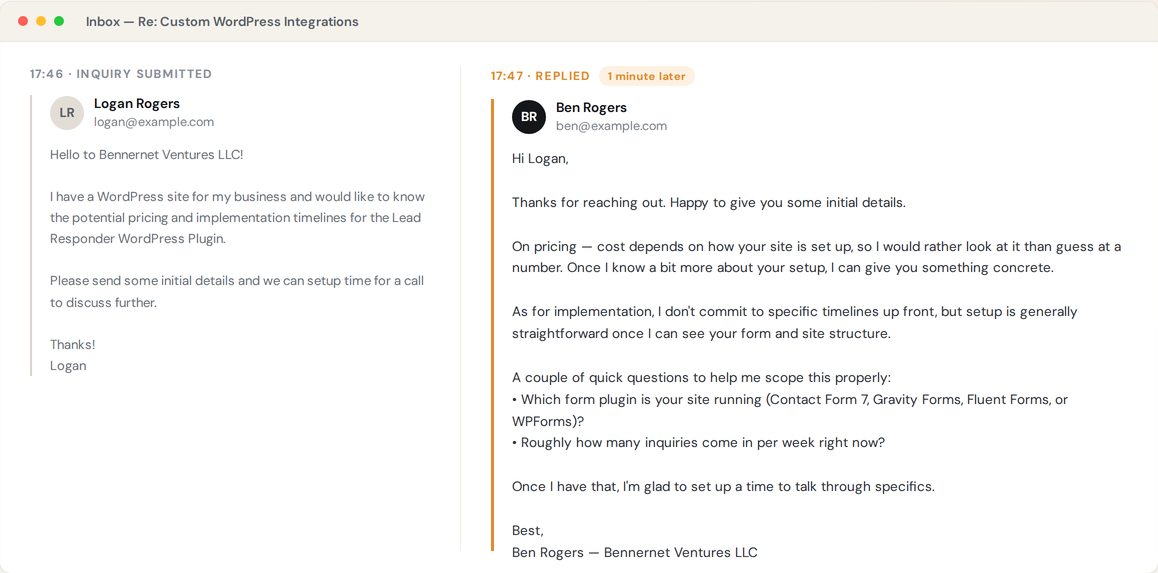
It reads what the person actually asked and answers that. Where it can’t answer — a price it hasn’t been given — it says so and asks the question that would let you answer properly.
What you see
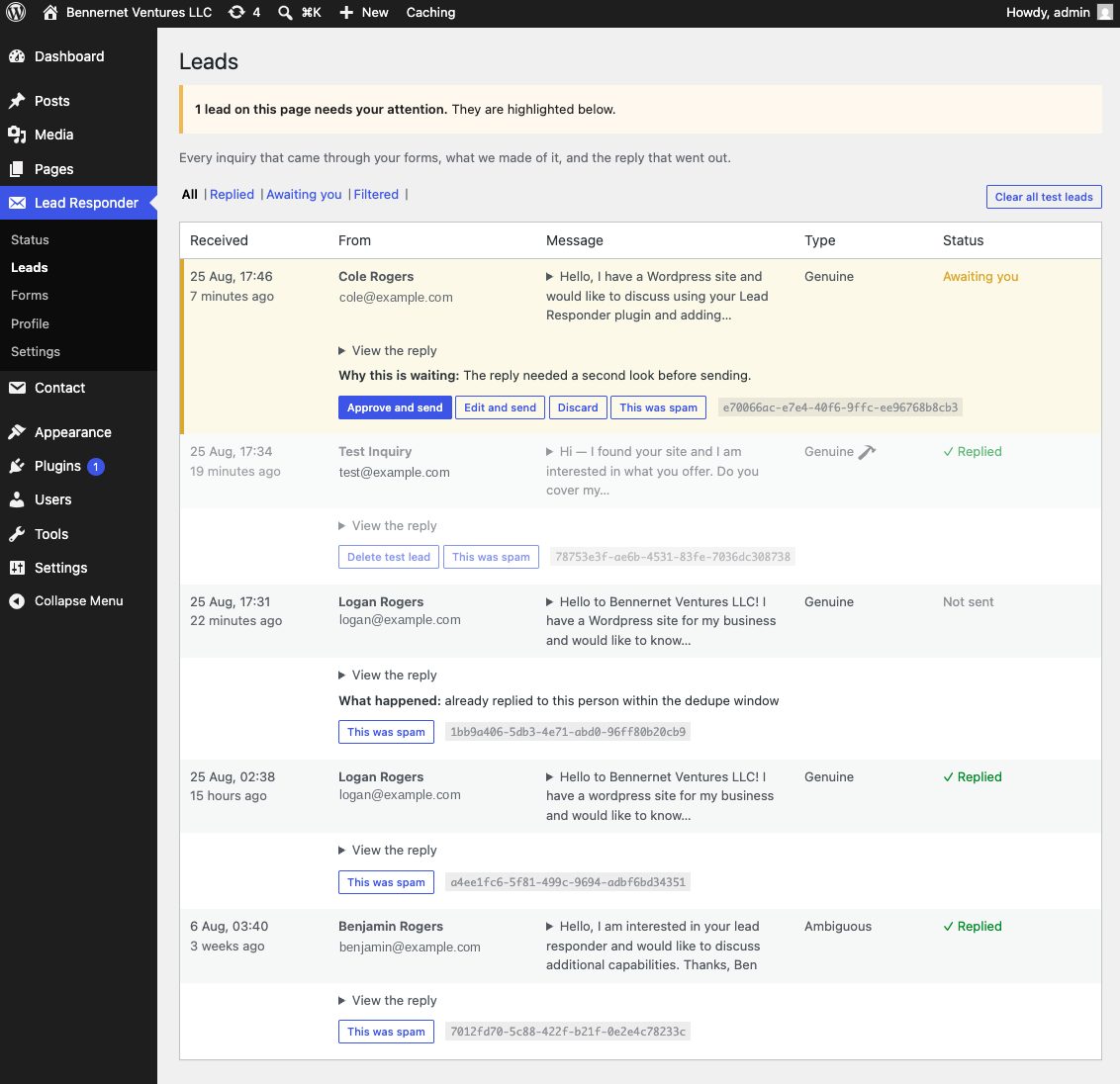
Every inquiry, and what became of it.
Sorted into genuine, ambiguous and spam. You can read every draft it wrote, including the ones it decided not to send and why.
- Replied — answered on its own, minutes after submission.
- Awaiting you — held for a second look. Approval is a setting; turn it off and these send too.
- Not sent — a duplicate caught inside the dedupe window, with the reason logged.
Containment
Contact forms get strange traffic.
Spam, vendor pitches, and people who have worked out there’s a model on the other end and would like it to promise them something. Six things stop any of that becoming your problem.
Approve before send
Start with every draft waiting for your click. Move to automatic when you have read enough of them to trust it.
A confidence floor
Even on automatic, a draft it isn’t sure about is held for you rather than sent. Uncertainty becomes your decision.
A do-not-say list
Prices, timelines, guarantees — whatever you haven’t authorised, it won’t say, however the question is phrased.
Injection is tested, not hoped for
A planted prompt injection is part of the test suite. Someone instructing the form to ignore its rules and quote them a price gets nowhere.
One reply per person
The same person submitting twice in a short window gets one email, not two. That guard is tested, because it fails silently when broken.
Nothing reaches in
There is no inbound route to your site at all. The gateway cannot call your WordPress install; it can only answer when your site asks.
Those last three fail silently when they break, so they are covered by automated tests rather than remembered — 131 across the plugin and the gateway. And what gets sent to the model, or comes back from it, is never written down: the call log keeps which site, which stage, how many tokens, and nothing else.
Questions
The ones people actually ask.
Is this a chat widget?
No. Nothing is added to your page and nothing pops up at your visitors. It works off the contact form you already have and answers by email, the way a person would.
Do I have to rebuild my forms?
No. It attaches to Contact Form 7 and WPForms as they are. No migration, no markup changes, no restyling.
What if it says something embarrassing?
Run it in approve-before-send and read every draft before it goes. On automatic, the confidence floor and the do-not-say list are what stand between an odd question and an odd answer.
What if the gateway goes down?
Your form and your usual notification email carry on exactly as before. The AI reply is skipped for that submission. The lead is never lost, because the plugin was never in the way of it — that one is on the release checklist, tested by stopping the gateway mid-flight.
How long is anything kept?
Lead content — the name, the email, the message, the draft — is deleted after 90 days. A de-identified record that a lead was handled is kept for a year, so the logs still add up after the content is gone.
Can a customer ask to be deleted?
Yes. They ask you, you forward it to [email protected], and I run the erasure — target five business days. It clears their name, address and message from the live system, including the awkward corners: bounce errors that quote a full address, validator logs that captured part of one. One thing is kept deliberately — a one-way hash of their email, which cannot be turned back into an address and is what stops a later submission from quietly triggering another automated reply.
The form on this site runs it.
Ask something real — about your setup, your forms, what this would take. Then watch your inbox. I read every message myself and follow up personally.